Specimen Paper2025

ICSE Class 10 Computer Applications — 2025 Specimen

36 solved questions from Solved 2025 Specimen Paper ICSE Class 10 Computer Applications. Every answer follows the ICSE marking scheme.

Section
Marks
Insight
1(i)1 Mark · 2025 · Section A · 2025 SpecimenFull page

Name the below structure:

Name the structure. One dimensional array, Two Dimensional array with 4 rows and 5 columns. ICSE 2025 Specimen Computer Applications Solved Question Paper.
Show SolutionHide Solution↓

Two Dimensional array with 4 rows and 5 columns

Reason — A two-dimensional array is like a grid or table with rows and columns. The image shows a table with 4 rows and 5 columns.
1(ii)1 Mark · 2025 · Section A · 2025 SpecimenFull page

"Java compiled code (byte code) can run on all operating systems"
— Name the feature.

Show SolutionHide Solution↓

Platform Independent

Reason — The feature of "Platform Independence" allows Java compiled code (bytecode) to run on any operating system. This is achieved through the Java Virtual Machine (JVM), which interprets the bytecode and executes it on the specific platform.

1(iii)1 Mark · 2025 · Section A · 2025 SpecimenFull page

The size of '\n' is:

Show SolutionHide Solution↓

2 bytes

Reason — In Java, \n (newline character) is a character literal. All character literals in Java, including escape sequences like \n, are stored as char data type, which occupies 2 bytes (16 bits) in memory.

1(iv)1 Mark · 2025 · Section A · 2025 SpecimenFull page

Identify the operator that gets the highest precedence while evaluating the given expression:

a + b % c * d - e

Show SolutionHide Solution↓

%

Reason — % and * have the highest precedence. Since % appears first in the expression, it takes precedence during evaluation.

1(v)1 Mark · 2025 · Section A · 2025 SpecimenFull page

Which of the following is a valid java keyword?

Show SolutionHide Solution↓

static

Reason — In Java, keywords are reserved words that have a specific meaning and purpose in the language. Keywords must always be written in lowercase. Analysing the given options:

  1. If: Incorrect because Java keywords are case-sensitive, and the correct keyword is if (in lowercase).
  2. BOOLEAN: Incorrect because the keyword in Java is boolean (in lowercase).
  3. static: Correct. static is a valid Java keyword used to declare static methods, variables, or blocks.
  4. Switch: Incorrect because the correct keyword is switch (in lowercase).
1(vi)1 Mark · 2025 · Section A · 2025 SpecimenFull page

The output of the following code is:

System.out.println(Math.ceil(6.4) + Math.floor(-1-2));
Show SolutionHide Solution↓

4.0

Reason — Let's evaluate the expression step by step:

System.out.println(Math.ceil(6.4) + Math.floor(-1 - 2));

Step 1: Evaluate Math.ceil(6.4)

  • The ceil method rounds a number up to the nearest integer.
  • Math.ceil(6.4) → 7.0 (as ceil returns a double).

Step 2: Evaluate -1 - 2

  • -1 - 2 = -3

Step 3: Evaluate Math.floor(-3)

  • Math.floor(-3): The floor method rounds a number down to the nearest integer.
  • Math.floor(-3) → -3.0 (as floor also returns a double).

Step 4: Add the Results

  • Math.ceil(6.4) + Math.floor(-3) → 7.0 + (-3.0)
  • Result = 4.0
1(vii)1 Mark · 2025 · Section A · 2025 SpecimenFull page

Which of the following returns a String?

Show SolutionHide Solution↓

replace(char, char)

Reason — The given methods return:

MethodReturn
Type
length()int
charAt(int)char
replace(char, char)String
indexOf(String)int
1(viii)1 Mark · 2025 · Section A · 2025 SpecimenFull page

Which of the following is not true with regards to a switch statement?

Show SolutionHide Solution↓

supports floating point constants

Reason — The switch statement does not support float or double constants as case labels. It supports byte, short, int, char, String and enum.

1(ix)1 Mark · 2025 · Section A · 2025 SpecimenFull page

Consider the array given below:

char ch[] = {'A','E','I','O', 'U'};

Write the output of the following statements:

System.out.println(ch[0]*2);:
Show SolutionHide Solution↓

130

Reason — The given array is:

char ch[] = {'A', 'E', 'I', 'O', 'U'};

Step-by-Step Execution:

1. ch[0]:

  • The element at index 0 of the array is 'A'.

2. Character Multiplication in Java:

  • In Java, a char is treated as a numeric value based on its ASCII code when used in arithmetic operations.
  • The ASCII value of 'A' is 65.

3. ch[0] * 2:

  • Substituting ch[0] with its ASCII value:
65 * 2 = 130

4. Output:

  • System.out.println(ch[0] * 2); will print 130.
1(x)1 Mark · 2025 · Section A · 2025 SpecimenFull page

To execute a loop 10 times, which of the following is correct?

Show SolutionHide Solution↓

for (int i=11;i<=30;i+=2)

Reason — To execute a loop 10 times, the total number of iterations should match 10, based on the condition and increment values. Let's analyse each option:

1. for (int i = 11; i <= 30; i += 2)

  • The loop starts at 11 and increments by 2.
  • The sequence is: 11, 13, 15, 17, 19, 21, 23, 25, 27, 29.
  • This loop executes 10 times.

2. for (int i = 11; i <= 30; i += 3)

  • The loop starts at 11 and increments by 3.
  • The sequence is: 11, 14, 17, 20, 23, 26, 29.
  • This loop executes only 7 times, so it is incorrect.

3. for (int i = 11; i < 20; i++)

  • The loop starts at 11 and increments by 1.
  • The sequence is: 11, 12, 13, 14, 15, 16, 17, 18, 19.
  • This loop executes only 9 times, so it is incorrect.

4. for (int i = 11; i <= 21; i++)

  • The loop starts at 11 and increments by 1.
  • The sequence is: 11, 12, 13, 14, 15, 16, 17, 18, 19, 20, 21.
  • This loop executes 11 times, so it is incorrect.
1(xi)1 Mark · 2025 · Section A · 2025 SpecimenFull page

A single dimensional array has 50 elements, which of the following is the correct statement to initialize the last element to 100.

Show SolutionHide Solution↓

x[49]=100

Reason — In Java, arrays use zero-based indexing, meaning the first element of the array is at index 0. For an array with n elements, the last element is at index n - 1.
Given a single-dimensional array with 50 elements, the indices range from 0 to 49. Thus, the correct index for the last element is 49.

1(xii)1 Mark · 2025 · Section A · 2025 SpecimenFull page

Method prototype for the method compute which accepts two integer arguments and returns true/false.

Show SolutionHide Solution↓

boolean compute (int a, int b)

Reason — Let's analyse the given options:

  1. void compute (int a, int b) — Incorrect because void means the method does not return any value, but the question requires the method to return true/false.

  2. boolean compute (int a, int b) — Correct because it returns a boolean value (true or false) and accepts two integer arguments.

  3. Boolean compute (int a, b) — Incorrect due to syntax error (int b is not fully declared). Also, Boolean is a wrapper class, not a primitive boolean.

  4. int compute (int a, int b) — Incorrect because the return type is int, not boolean.

1(xiii)1 Mark · 2025 · Section A · 2025 SpecimenFull page

The statement that brings the control back to the calling method is:

Show SolutionHide Solution↓

return

Reason — The return statement in Java is used to bring the control back to the calling method. If the method has a return type other than void, the return statement also passes back a value to the calling method.

1(xiv)1 Mark · 2025 · Section A · 2025 SpecimenFull page

The default value of a boolean variable is:

Show SolutionHide Solution↓

false

Reason — In Java, the default value of a variable depends on its data type. For a boolean variable, the default value is false (in lowercase). This is because Java uses the primitive boolean type, which has only two possible values: true or false.

1(xv)1 Mark · 2025 · Section A · 2025 SpecimenFull page

The method to convert a lowercase character to uppercase is:

Show SolutionHide Solution↓

Character.toUpperCase( char )

Reason — The method Character.toUpperCase(char) is used to convert a single lowercase character to its uppercase equivalent. It belongs to the Character class in Java.

1(xvi)1 Mark · 2025 · Section A · 2025 SpecimenFull page

Assertion (A): Integer class can be used in the program without calling a package.

Reason (R): It belongs to the default package java.lang.

Show SolutionHide Solution↓

Both Assertion (A) and Reason (R) are true and Reason (R) is a correct explanation of Assertion (A)

Reason — The Integer class can indeed be used in a program without explicitly importing any package. This is because it is part of the java.lang package, which is automatically imported in every Java program by default.

1(xvii)1 Mark · 2025 · Section A · 2025 SpecimenFull page

A student executes the following code to increase the value of a variable ‘x’ by 2.

He has written the following statement, which is incorrect.

x = +2;

What will be the correct statement?

A. x +=2;
B. x =2;
C. x = x +2;

Show SolutionHide Solution↓

Both A and C

Reason — The student's code x = +2; is incorrect because it doesn't actually increment x by 2. Instead, it simply assigns the value +2 to x.

The correct way to increment the value of x by 2 is:

  1. Option A: x += 2;
    This is shorthand for x = x + 2; and correctly increments x by 2.

  2. Option C: x = x + 2;
    This is the full, explicit version of incrementing x by 2. It is also correct.

Option B: x = 2;
This assigns 2 to x, which is not incrementing its value. Hence, this is incorrect.

1(xviii)1 Mark · 2025 · Section A · 2025 SpecimenFull page

The statement used to find the total number of Strings present in the string array String s[] is:

Show SolutionHide Solution↓

s.length

Reason — In Java, arrays have a property called length, which gives the total number of elements in the array. This applies to any type of array, including arrays of Strings.

For a string array String s[], the correct way to get the number of elements is:

s.length

Analysing other options:

  1. s.length():

    • Incorrect. The length() method is used for String objects to get the number of characters in a String, not for arrays.
  2. length(s):

    • Incorrect. This is not a valid syntax in Java.
  3. len(s):

    • Incorrect. Java does not have a function called len() for arrays or strings.
1(xix)1 Mark · 2025 · Section A · 2025 SpecimenFull page

Consider the following program segment in which the statements are jumbled, choose the correct order of statements to swap two variables using the third variable.

void swap(int a, int b)
{	
  a = b;      → (1)
  b = t;      → (2)
  int t = 0;  → (3)
  t = a;      → (4)
}
Show SolutionHide Solution↓

(3) (4) (1) (2)

Reason — To swap two variables a and b using a third variable t, the correct sequence of statements is:

Step 1: Declare and initialize the third variable t.

int t = 0;  // (3)

Step 2: Assign the value of a to t.

t = a;  // (4)

Step 3: Assign the value of b to a.

a = b;  // (1)

Step 4: Assign the value of t (original value of a) to b.

b = t;  // (2)

Correct Order:

int t = 0;  // (3)
t = a;      // (4)
a = b;      // (1)
b = t;      // (2)
1(xx)1 Mark · 2025 · Section A · 2025 SpecimenFull page

Assertion (A): An argument is a value that is passed to a method when it is called.

Reason (R): Variables which are declared in a method prototype to receive values are called actual parameters

Show SolutionHide Solution↓

Assertion (A) is true and Reason (R) is false

Explanation — Arguments are the actual values passed to a method when it is invoked. For example:

void exampleMethod(int x) { ... }  
exampleMethod(5);  // Here, 5 is the argument.

Hence, Assertion (A) is true.

The variables declared in a method prototype (or header) to receive values are called formal parameters, not actual parameters. For example:

void exampleMethod(int x) {  // x is the formal parameter
    System.out.println(x);
}
exampleMethod(5);  // 5 is the actual parameter

Hence, Reason (R) is false.

2(i)1 Mark · 2025 · Section A · 2025 SpecimenFull page

Rewrite the following code using single if statement.

if(code=='g')
System.out.println("GREEN"); 
else if(code=='G') 
System.out.println("GREEN");
Show SolutionHide Solution↓

The code can be rewritten using a single if statement as follows:

if(code == 'g' || code == 'G')
    System.out.println("GREEN");

Explanation:

  • The logical OR operator (||) is used to check if code is either 'g' or 'G'.
  • If either condition is true, the statement System.out.println("GREEN"); will execute. This simplifies the multiple if-else blocks into a single if statement.
2(ii)1 Mark · 2025 · Section A · 2025 SpecimenFull page

Evaluate the given expression when the value of a=2 and b=3

b*=a++ - ++b + ++a;
System.out.println("a= "+a); 
System.out.println("b= "+b);
Show SolutionHide Solution↓

a = 4, b = 6

Explanation:

The given expression is evaluated as follows:

b*=a++ - ++b + ++a
b = b * (a++ - ++b + ++a) [a=2, b=3]
b = 3 * (2 - 4 + 4) [a=4, b=4]
b = 3 * 2
b = 6

2(iii)1 Mark · 2025 · Section A · 2025 SpecimenFull page

A student executes the following program segment and gets an error. Identify the statement which has an error, correct the same to get the output as WIN.

boolean x = true; 
switch(x)
{ 
  case 1: System.out.println("WIN"); break;
  case 2: System.out.println("LOOSE");
}
Show SolutionHide Solution↓

Statement having the error is:

boolean x = true;

Corrected code:

int x = 1; // Change boolean to int
switch(x)
{ 
  case 1: System.out.println("WIN"); break;
  case 2: System.out.println("LOOSE");
}

Explanation:

The error occurs because the switch statement in Java does not support the boolean data type. A switch expression must be one of the following types:

  • int, byte, short, char, String, or an enum.

Replacing boolean x = true; with int x = 1; ensures that the switch statement now uses a valid data type (int). Assigning x = 1 makes the case 1 to execute printing WIN as the output.

2(iv)1 Mark · 2025 · Section A · 2025 SpecimenFull page

Write the Java expression for $\sqrt[3]{x}+ \sqrt{y}$

Show SolutionHide Solution↓

The Java expression for the given mathematical expression can be written as:

Math.cbrt(x) + Math.sqrt(y);
2(v)1 Mark · 2025 · Section A · 2025 SpecimenFull page

How many times will the following loop execute? Write the output of the code:

int x=10; 
while (true){
System.out.println(x++ * 2);
if(x%3==0)
break;
} 
Show SolutionHide Solution↓

The loop executes two times.

Output

20
22

Explanation:

Step-by-Step Execution of the Code

Initial Value of x:
x = 10

Iteration 1:
System.out.println(x++ * 2);

  • x++ → Use the current value of x (10), then increment x to 11.
  • Output: 10 * 2 = 20

if (x % 3 == 0):

  • x = 11, so 11 % 3 = 2 → Condition is false.

Iteration 2:
System.out.println(x++ * 2);

  • x++ → Use the current value of x (11), then increment x to 12.
  • Output: 11 * 2 = 22

if (x % 3 == 0):

  • x = 12, so 12 % 3 = 0 → Condition is true.

break;

  • The break statement exits the loop.
2(vi)1 Mark · 2025 · Section A · 2025 SpecimenFull page

Write the output of the following String methods:

String x= "Galaxy", y= "Games";

(a) System.out.println(x.charAt(0)==y.charAt(0));

(b) System.out.println(x.compareTo(y));

Show SolutionHide Solution↓

The outputs are:

(a) true

(b) -1

Explanation:

Given Strings:

String x = "Galaxy";
String y = "Games";

(a) System.out.println(x.charAt(0) == y.charAt(0));

  1. x.charAt(0): Retrieves the character at index 0 of x → 'G'.

  2. y.charAt(0): Retrieves the character at index 0 of y → 'G'.

  3. Comparison: 'G' == 'G' → true.

(b) System.out.println(x.compareTo(y));

  1. x.compareTo(y): Compares x ("Galaxy") with y ("Games") lexicographically (character by character based on Unicode values). The comparison is based on the first differing character:

    • 'G' == 'G' → Equal, move to the next characters.
    • 'a' == 'a' → Equal, move to the next characters.
    • 'l' == 'm' → 'l' (Unicode 108) is less than 'm' (Unicode 109).
  2. Result:

    • x.compareTo(y) → 108 - 109 = -1.
2(vii)1 Mark · 2025 · Section A · 2025 SpecimenFull page

Predict the output of the following code snippet:

char ch='B',
char chr=Character.toLowerCase(ch); 
int n=(int)chr-10; 
System.out.println((char)n+"\t"+chr);
Show SolutionHide Solution↓
X	b

Step-by-Step Execution:

char ch = 'B';

  • ch is assigned the character 'B'.

char chr = Character.toLowerCase(ch);

  • Character.toLowerCase(ch) converts 'B' to its lowercase equivalent 'b'.
  • chr = 'b'.

int n = (int) chr - 10;

  • (int) chr converts the character 'b' to its ASCII value.
  • ASCII value of 'b' is 98.
  • n = 98 - 10 = 88.

System.out.println((char) n + "\t" + chr);

  • (char) n: Converts the integer 88 back to a character.
    • ASCII value 88 corresponds to the character 'X'.
  • + "\t" + adds a tab space between the characters.
  • chr: The value of chr is 'b'.
2(viii)1 Mark · 2025 · Section A · 2025 SpecimenFull page

A student is trying to convert the string present in x to a numerical value, so that he can find the square root of the converted value. However the code has an error. Name the error (syntax / logical / runtime). Correct the code so that it compiles and runs correctly.

String x= "25";
int y=Double.parseDouble(x); 
double r=Math.sqrt(y); 
System.out.println(r);
Show SolutionHide Solution↓

Syntax error in the line:
int y=Double.parseDouble(x);

Corrected code:

String x= "25";
double y=Double.parseDouble(x); //int changed to double
double r=Math.sqrt(y); 
System.out.println(r);

Explanation:

The error is a syntax error because the method Double.parseDouble(x) returns a double, but the code is trying to assign it to an int variable without proper casting, which is not allowed in Java.

2(ix)1 Mark · 2025 · Section A · 2025 SpecimenFull page

Consider the following program segment and answer the questions below:

class calculate

{
  int a; double b; 
  calculate()

  {

  a=0; 
  b=0.0;

  }

  calculate(int x, double y)

  {

  a=x;
  b=y;

  }

void sum()

{

  System.out.println(a*b);

}}

Name the type of constructors used in the above program segment?

Show SolutionHide Solution↓

The type of constructors used in the above program segment are:

  1. Default constructor
  2. Parameterized constructor

Explanation:

The types of constructors used in the given program are:

1. Default Constructor:

calculate() {
    a = 0;
    b = 0.0;
}
  • A default constructor is a constructor that does not take any parameters.
  • It initializes the instance variables a and b with default values (0 and 0.0 respectively).

2. Parameterized Constructor:

calculate(int x, double y) {
    a = x;
    b = y;
}
  • A parameterized constructor is a constructor that takes arguments (int x and double y in this case).
  • It allows for initializing the instance variables a and b with specific values provided during object creation.
2(x)1 Mark · 2025 · Section A · 2025 SpecimenFull page

Consider the following program segment and answer the questions given below:

int x[][] = { {2,4,5,6}, {5,7,8,1}, {34, 1, 10, 9}};

(a) What is the position of 34?

(b) What is the result of x[2][3] + x[1][2]?

Show SolutionHide Solution↓

(a) The position of 34 is x[2][0]

(b) x[2][3] + x[1][2] = 9 + 8 = 17

Explanation:

(a) Position of 34

  • The array x is a 2D array, where elements are accessed using row and column indices.
  • The element 34 is located in the 3rd row and 1st column.
  • In zero-based indexing:
    • Row index: 2
    • Column index: 0

Position: x[2][0]

(b) Result of x[2][3] + x[1][2]

Step 1: Locate x[2][3]

  • x[2][3] refers to the element in the 3rd row and 4th column.
  • Value at x[2][3] = 9.
  • x[1][2] refers to the element in the 2nd row and 3rd column.
  • Value at x[1][2] = 8.
  • x[2][3] + x[1][2] = 9 + 8 = 17.
3Written · 2025 · Section B · 2025 SpecimenFull page

Define a class with the following specifications:

Class name: Bank

Member variables:
double p — stores the principal amount
double n — stores the time period in years
double r — stores the rate of interest
double a — stores the amount

Member methods:
void accept () — input values for p and n using Scanner class methods only.
void calculate () — calculate the amount based on the following conditions:

Time in (Years)Rate %
Upto 1⁄29
> 1⁄2 to 1 year10
> 1 to 3 years11
> 3 years12

$a = p\Big(1+\frac{r}{100}\Big)^n$

void display () — display the details in the given format.

Show SolutionHide Solution↓
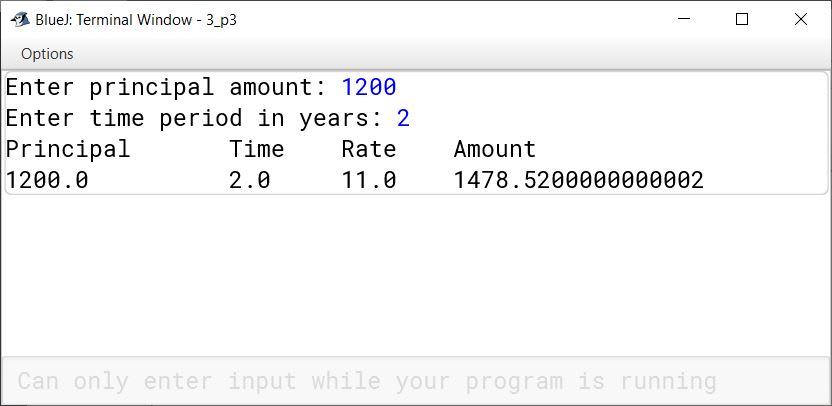
Principal	Time	Rate	Amount

XXX	        XXX	    XXX	    XXX

Write the main method to create an object and call the above methods.

import java.util.Scanner;

public class Bank
{
    private double p;
    private double n;
    private double r;
    private double a;

    void accept() {
        Scanner in = new Scanner(System.in);

        System.out.print("Enter principal amount: ");
        p = in.nextDouble();

        System.out.print("Enter time period in years: ");
        n = in.nextDouble();
    }
    
    void calculate() {
        if (n <= 0.5) {
            r = 9;
        } else if (n <= 1) {
            r = 10;
        } else if (n <= 3) {
            r = 11;
        } else {
            r = 12;
        }

        a = p * Math.pow(1 + (r / 100), n);
    }
    
    void display() {
        System.out.println("Principal\tTime\tRate\tAmount");
        System.out.println(p + "\t" + n + "\t" + r + "\t" + a);
    }
    
    public static void main(String args[]) {
        Bank b = new Bank();
        b.accept();
        b.calculate();
        b.display();
    }
}
BlueJ output of Bank.java
4Written · 2025 · Section B · 2025 SpecimenFull page

Define a class to search for a value input by the user from the list of values given below. If it is found display the message "Search successful", otherwise display the message "Search element not found" using Binary search technique.

5.6, 11.5, 20.8, 35.4, 43.1, 52.4, 66.6, 78.9, 80.0, 95.5.

Show SolutionHide Solution↓
import java.util.Scanner;

public class KboatBinarySearch
{
    void search(double[] arr, double key) {
        int low = 0;
        int high = arr.length - 1;
        boolean found = false;

        while (low <= high) {
            int mid = (low + high) / 2;

            if (arr[mid] == key) {
                found = true;
                break;
            } else if (arr[mid] < key) {
                low = mid + 1;
            } else {
                high = mid - 1;
            }
        }

        if (found) {
            System.out.println("Search successful");
        } else {
            System.out.println("Search element not found");
        }
    }
    
    public static void main(String[] args) {
        Scanner in = new Scanner(System.in);
        
        double[] values = {5.6, 11.5, 20.8, 35.4, 43.1, 52.4, 66.6, 78.9, 80.0, 95.5};

        System.out.print("Enter the value to search: ");
        double key = in.nextDouble();

        KboatBinarySearch obj = new KboatBinarySearch();
        obj.search(values, key);
    }
}
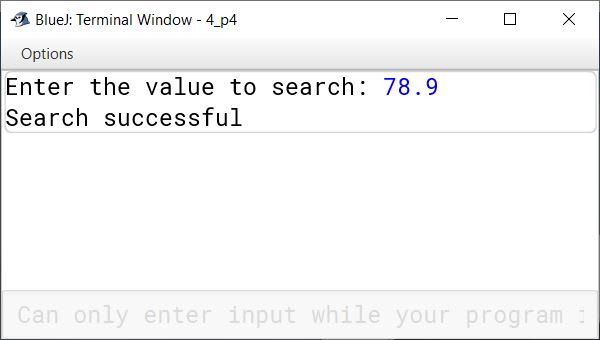
BlueJ output of KboatBinarySearch.java BlueJ output of KboatBinarySearch.java
5Written · 2025 · Section B · 2025 SpecimenFull page

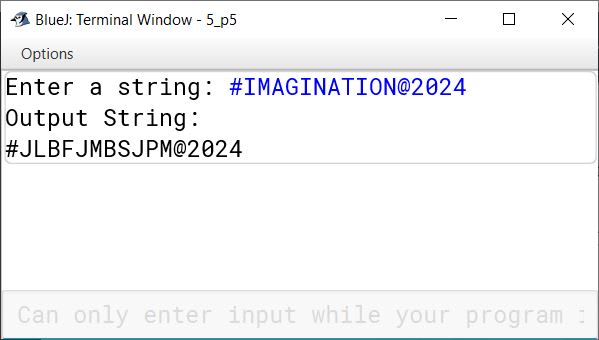
Define a class to accept a string and convert the same to uppercase, create and display the new string by replacing each vowel by immediate next character and every consonant by the previous character. The other characters remain the same.

Example:
Input : #IMAGINATION@2024
Output : #JLBFJMBSJPM@2024

Show SolutionHide Solution↓
import java.util.Scanner;

public class KboatStringConvert
{
    public static void main(String args[]) {
        Scanner in = new Scanner(System.in);
        System.out.print("Enter a string: ");
        String str = in.nextLine();
        str = str.toUpperCase();
        int l = str.length();
        
        String res = "";
        
        for (int i = 0; i < l; i++) {
            char ch = str.charAt(i);
            if ("AEIOU".indexOf(ch) != -1) {
                res += (char)(ch + 1);
            }
            else if (Character.isLetter(ch)) {
                res += (char)(ch - 1);
            }
            else {
                res += ch;
            }
        }
        
        System.out.println("Output String:");
        System.out.println(res);
    }
}
BlueJ output of KboatStringConvert.java
6Written · 2025 · Section B · 2025 SpecimenFull page

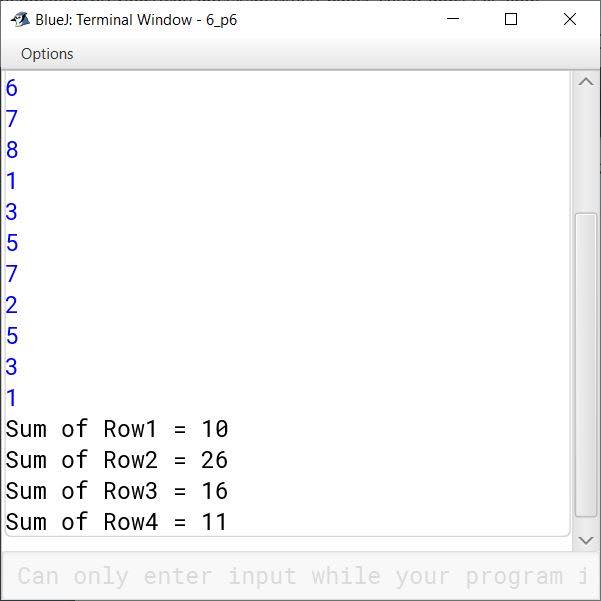
Define a class to accept values into 4x4 array and find and display the sum of each row.

Example:

A[][]={{1,2,3,4},{5,6,7,8},{1,3,5,7},{2,5,3,1}}

Output:

Show SolutionHide Solution↓
sum of row 1 = 10 (1+2+3+4)
sum of row 2 = 26 (5+6+7+8)
sum of row 3 = 16 (1+3+5+7)
sum of row 4 = 11 (2+5+3+1)
import java.util.Scanner;

public class KboatDDARowSum
{
    public static void main(String args[]) {
        Scanner in = new Scanner(System.in);
        int arr[][] = new int[4][4];

        System.out.println("Enter 4x4 DDA elements:");
        for (int i = 0; i < 4; i++) {
            for (int j = 0; j < 4; j++) {
                arr[i][j] = in.nextInt();
            }
        }

        for (int i = 0; i < 4; i++) {
            int rowSum = 0;
            for (int j = 0; j < 4; j++) {
                rowSum += arr[i][j];
            }
            System.out.println("Sum of Row" + (i+1) 
                                + " = " + rowSum);
        }
    }
}
BlueJ output of KboatDDARowSum.java
7Written · 2025 · Section B · 2025 SpecimenFull page

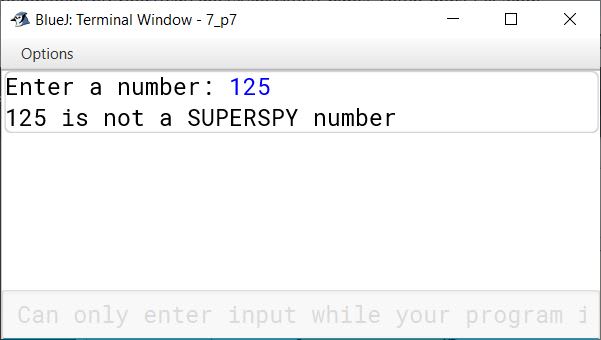
Define a class to accept a number and check whether it is a SUPERSPY number or not. A number is called SUPERSPY if the sum of the digits equals the number of the digits.

Example1:

Show SolutionHide Solution↓
Input: 1021
output: SUPERSPY number [SUM OF THE DIGITS = 1+0+2+1 = 4,
NUMBER OF DIGITS = 4 ]

Example2:

Input: 125
output: Not an SUPERSPY number [1+2+5 is not equal to 3]
import java.util.Scanner;

public class KboatSuperSpy
{
    public static void main(String args[]) {
        Scanner in = new Scanner(System.in);
        System.out.print("Enter a number: ");
        int num = in.nextInt();
        
        int sum = 0;
        int dc = 0;
        int orgNum = num;
        
        while (num > 0) {
            int d = num % 10;
            sum += d;
            dc++;
            num /= 10;
        }
        
        if (sum == dc) {
            System.out.println(orgNum + " is a SUPERSPY number");
        }
        else {
            System.out.println(orgNum + " is not a SUPERSPY number");
        }
    }
}
BlueJ output of KboatSuperSpy.java BlueJ output of KboatSuperSpy.java
8Written · 2025 · Section B · 2025 SpecimenFull page

Define a class to overload the method display() as follows:

void display(): To print the following format using nested loop.

1 2 1 2 1
1 2 1 2 1
1 2 1 2 1

void display (int n, int m) : To print the quotient of the division of m and n if m is greater than n otherwise print the sum of twice n and thrice m.

double display (double a, double b, double c) — to print the value of z where

$z = p \times q$

$p = \frac{a + b}{c}$

$q = a + b + c$

Show SolutionHide Solution↓
public class KboatOverloadDisplay
{
    void display() {
        for (int i = 0; i < 3; i++) {
            for (int j = 0; j < 5; j++) {
                if (j % 2 == 0) {
                    System.out.print("1  ");
                } else {
                    System.out.print("2  ");
                }
            }
            System.out.println();
        }
    }
    
    void display(int n, int m) {
        if (m > n) {
            double q = m / n;
            System.out.println("Quotient: " + q);
        } else {
            int sum = 2 * n + 3 * m;
            System.out.println("Sum: " + sum);
        }
    }
    
    double display(double a, double b, double c) {
        double p = (a + b) / c;
        double q = a + b + c;
        double z = p * q;
        System.out.println("Z = " + z);
        return z;
    }
}
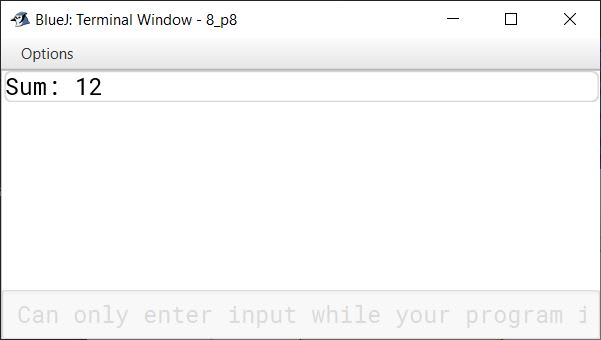
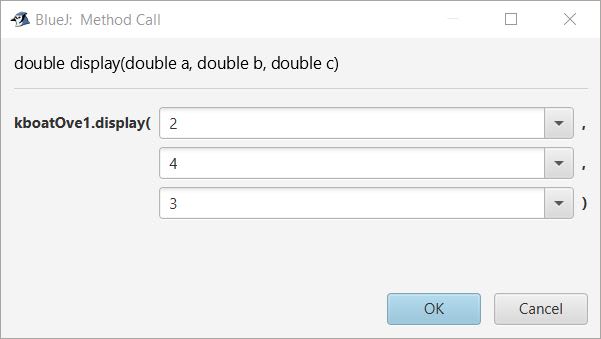
BlueJ output of KboatOverloadDisplay.java BlueJ output of KboatOverloadDisplay.java BlueJ output of KboatOverloadDisplay.java BlueJ output of KboatOverloadDisplay.java BlueJ output of KboatOverloadDisplay.java BlueJ output of KboatOverloadDisplay.java BlueJ output of KboatOverloadDisplay.java

Press ↓ to reveal a solution and move to the next question. Browse the free sample bank.

All 357 Computer Applications questions